FaceLab: Future Face Aging App
- 3.8
- Rating
- 50.00M
- Installs
- Free
- Price
 Analysis by App-foxy
FaceLab is the kind of photography app I would show a friend when we want to turn an ordinary portrait into something playful. Its focus is face editing: aging a face, trying a gender-swap effect, changing the apparent face shape, or experimenting with hairstyles. I found the appeal less in producing a serious portrait and more in seeing how one photo can become several different versions of the same person.
The app comes from Lyrebird Studio and is free to install, with optional purchases ranging from around two dollars to nearly sixty dollars per item. That makes it easy to try without committing money first, although you should pay attention to which tools or results are available without an upgrade. It is rated for Everyone, so its general presentation is accessible to a broad audience, including families looking for light entertainment rather than a professional retouching suite.
What FaceLab feels like when you first open it
My first impression was that FaceLab is built around quick visual experiments rather than careful manual editing. You choose a portrait, apply a transformation, and judge the result immediately. That simplicity is useful for a first-time user because there is no need to understand layers, masks, curves, or detailed retouching controls before getting started.
You May Also Like

 Blood Strike: 2.5 Anniversary
Blood Strike’s Loadouts Turn Every Drop Into a Tactical Gamble
A close look at Blood Strike’s custom loadouts: how fast access to signature weapons reshapes its battle royale rhythm, rewards preparation, and narrows the gap between fights.

 Pandora - Music & Podcasts
Pandora’s Music Is Easy to Start, but Harder to Recover
Pandora’s strength is its low-effort path from a seed to a station. Its weak spot is how much confidence it asks you to place in connection, setup, and quiet recovery.

 8 Ball Pool
 Is Built on Rivalries, Rematches, and Routine
A close look at the rivalries, rematches, shared routines, and unanswered safety questions that turn a quick pool match into a persistent mobile community.

 Samsung Music
’s Quiet Strength Is Playing What You Already Own
Its reach comes less from spectacle than from dependable access to a personal library. That simplicity is both the app’s strongest retention engine and its ceiling.

 AccuWeather: Weather Radar
AccuWeather Review: A Quick, Clear Forecast for Everyday Decisions
For everyday plans, the best forecast is the one you can understand quickly. AccuWeather makes rain timing, radar, and local conditions easy to act on, with a few trade-offs.

 Hill Climb Racing
Why Hill Climb Racing Still Turns Crashes Into One More Run
A tiny car, a bumpy hill and one more upgrade: Hill Climb Racing keeps resurfacing because its simple chaos makes every near-miss feel personal.
More From Our News Desk



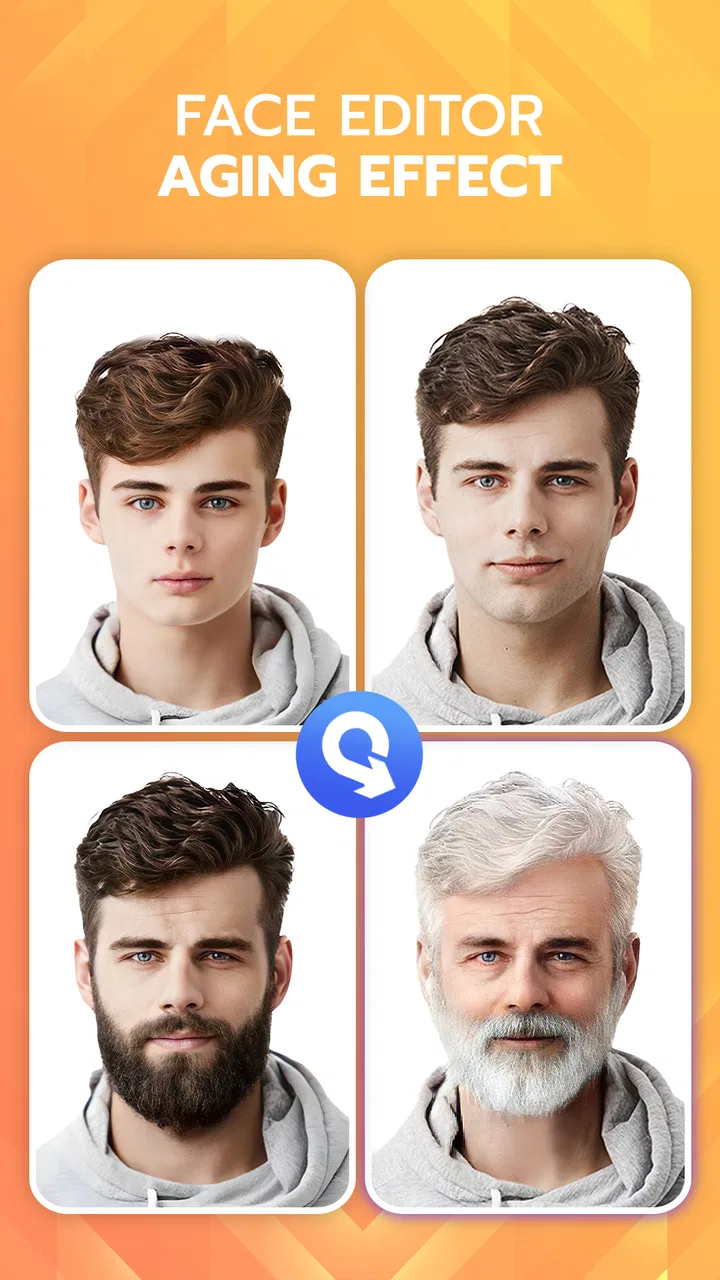
The main attraction is the way the app changes the perceived identity or age of a face. An older-looking version can be amusing, while a hairstyle or face-shape adjustment can help you imagine a different look. The results are best treated as creative previews, not as reliable predictions of how someone will actually look in the future or with a different haircut.
I also like that the app sits between a camera toy and a social-photo editor. A normal camera app mainly records what is in front of you, while a traditional editor expects you to make many adjustments yourself. FaceLab instead gives you a specific visual idea and lets you test it quickly. That makes it more approachable than a full editing application, but also less suitable when you need precise control.
The popularity is easy to understand: the app has passed fifty million installs and holds an average rating of about four stars from roughly seven hundred eighty thousand ratings. Those figures suggest that many people enjoy the basic concept, but they should not be read as a promise that every portrait will look equally convincing. Face shape, lighting, expression, hair, and camera angle all affect the outcome.
For a first meaningful result, I recommend starting with a clear, front-facing portrait containing one person. Avoid a picture where the face is tiny, heavily shadowed, partly hidden by sunglasses, or covered by another object. This is not just a quality preference. A clean starting image gives the app a better chance of placing its effects naturally, so you can judge the editing idea instead of blaming a poor source photo.
Choosing the right photo before editing
A useful everyday workflow is to take a fresh selfie near a window, with the camera held roughly at eye level. Soft daylight usually gives the face more even definition than a bright overhead lamp. Keep a relaxed expression for the first attempt, because an exaggerated smile or turned head can make an age or face-shape effect appear less believable.
If you are editing a group photograph, crop to one person first when possible. A crowded image makes it harder to know which face the app should prioritize, and it also makes the final result less useful for comparison. I would save group experiments for later, after you understand how the app behaves with a simple portrait.
Another small but important choice is consistency. If you want to compare several hairstyles or transformations, use the same original photo each time. Switching between different expressions and angles can make one result seem better simply because the source image was more flattering. Keeping one reference portrait turns the app from a random toy into a more controlled experiment.
Getting through setup without confusion
FaceLab runs on Android devices using version 7.0 or later, so compatibility is broad for many phones. After installation, I would move through the opening screens slowly rather than tapping through automatically. Photo editors often place access requests, subscription offers, or introductory choices close together, and a hurried tap can lead you into a purchase screen before you have seen what the free experience is like.
The app is free to download, but in-app purchases are part of the experience. I would first test the basic workflow and confirm that the style of results suits you before considering anything paid. This is especially important if you only want one funny image for a message or social post; paying for a broader collection may not be worthwhile for such a small use case.
When the app asks you to select an image, choose one from your gallery that you are comfortable editing. A good first session is not the time to use an irreplaceable original photograph. Keep the untouched version in your gallery and treat the edited result as a separate creation. That habit protects your reference image and makes it easier to compare different attempts.
I would also check the wording on any button that leads to an upgraded feature. The difference between previewing an effect and exporting or unlocking it can matter. If the screen presents a trial or purchase option, read the terms shown there before continuing. The app’s free entry point is convenient, but the optional paid items mean that “free to install” does not mean every transformation is included at no cost.
One point that may surprise new users is that a transformation can look more dramatic in the preview than it does after you inspect the whole image. Face-focused effects draw attention to the eyes, mouth, skin, and hair, while the rest of the portrait remains unchanged. I always zoom out mentally and ask whether the edited face matches the lighting and proportions of the original photograph.
Making the first successful edit
For a reliable first attempt, I would begin with the aging effect. Pick a straight-on portrait, select the age-related option, and wait for the preview to finish. The meaningful success is not simply seeing a changed face; it is producing an image that still resembles the original person enough to share as a joke or keep as a comparison.
Once that works, try a hairstyle or face-shape option using the same photograph. This creates a helpful baseline. If the aging result is clear but the hairstyle looks awkward, you can tell that the issue is probably the specific effect or the hair position rather than your entire setup. Testing one change at a time prevents the session from becoming confusing.
I found it useful to judge results using three questions: does the face remain recognizable, does the edit follow the original head position, and does the new appearance fit the lighting? An effect can be technically noticeable yet still look artificial if the face is turned away or the hairline is obscured. These checks are more useful than simply asking whether the image looks “real.”
A realistic scenario would be preparing a birthday message for a parent or friend. I would take a clear portrait, create an older-looking version, then perhaps make a second version with a different hairstyle. The fun comes from presenting the two images together and letting the person react. For this kind of short, personal project, FaceLab is quicker than opening a desktop editor and trying to construct the same joke manually.
For a more thoughtful use, you could use the hairstyle tools as a conversation starter before making a real change. I would not treat the image as a dependable salon preview, because hair texture, volume, color, and the actual cut can differ greatly from a digital overlay. Still, it can help you decide which general direction feels interesting enough to discuss with a stylist.
Where first-time users can misread the results
The biggest source of confusion is assuming that an age transformation is a prediction. It is better understood as a stylized interpretation of the selected portrait. The image may exaggerate certain facial details to communicate “older” or “younger,” so I would enjoy it as an imaginative filter rather than a statement about health, genetics, or a person’s actual future appearance.
Gender-swap effects deserve the same cautious reading. They can create a playful alternate presentation, but they cannot capture the full range of personal identity or guarantee that the result will look natural. I would use the feature for experimentation and humor, while avoiding conclusions about someone based on a generated image.
Another common misunderstanding is expecting every result to work equally well on every face. A portrait with a strong side angle, hair across the forehead, a hand near the mouth, or harsh backlighting gives the editor less visual information. If the result is distorted, try a better source image before deciding that the feature is poor. On the other hand, if several clean portraits produce the same problem, that particular effect may simply not suit your expectations.
Face shape can also be easy to overinterpret. A subtle change may be more flattering than a dramatic one, but a stronger setting can make the edit obvious enough to feel artificial. When an option allows any degree of variation, I prefer moderation. The goal is usually to imagine a possible look, not to replace every recognizable feature.
Privacy is worth considering whenever you use a face-editing service. I would avoid uploading photographs of children, friends, or colleagues without permission, especially if the final image might be shared publicly. The Everyone age rating describes the broad audience suitability of the app; it does not remove the need to handle personal photographs thoughtfully.
How it compares with ordinary camera and editing apps
Compared with a standard camera application, FaceLab is far more entertaining after the photo has been taken. A camera gives you dependable control over framing and exposure, while this app is designed to reinterpret the face. If your priority is capturing a sharp, natural photograph, I would use the phone’s camera first and bring the best image into FaceLab afterward.
Compared with a manual editor, FaceLab is faster but less exact. A professional retouching app is better when you need to remove a small blemish, adjust a specific area, preserve realistic skin texture, or control every part of the composition. FaceLab wins when the question is, “What would I look like with this broad change?” rather than, “Can I make this one pixel-perfect correction?”
It also differs from a simple beauty filter. Beauty filters generally aim to improve or smooth the existing portrait, whereas FaceLab’s appeal is transformation. That distinction matters if you want a natural profile picture. I would choose FaceLab for a playful before-and-after, then use a conventional editor or the camera’s own tools for a polished image intended to look like you on an ordinary day.
The trade-off is convenience versus predictability. Automated effects save time and make experimentation accessible, but they may produce an uneven result when the input does not match the effect’s assumptions. Manual tools take longer, yet they let you correct exactly what bothers you. For most casual users, FaceLab is the better first stop for curiosity, not the final stop for professional photography.
Making the second session more useful
After the first successful edit, I would create a small personal workflow rather than tapping through every option at random. Keep one original portrait, make one age variation, one hairstyle variation, and one face-shape variation, then compare them side by side. This reveals which type of transformation you actually enjoy and avoids spending money on features you are unlikely to use.
Use the same lighting and expression for comparisons. If you want to test hairstyles, keep the face position unchanged. If you want to explore aging, try a second portrait with a slightly different expression only after you have a baseline. This simple method is one of the most useful ways to get consistent value from the app, because it separates the effect from the quality of the photograph.
I would also decide in advance where the result is going. A private joke, a family chat, and a public profile image call for different levels of restraint. A dramatic transformation may be perfect for a humorous message but unsuitable for a professional account. FaceLab makes it easy to create something attention-grabbing, so the responsibility for choosing the right audience remains with you.
Sharing is not the only worthwhile outcome. You can use the app as a visual brainstorming tool for a costume, a themed party, a fictional character, or a playful family comparison. The important distinction is to label the result mentally as an edited concept. That keeps the experience fun without turning an automated image into evidence about real appearance.
The current version is 4.5.72, and the app has been available since late October 2020. Its long presence and large user base make it feel like an established choice in this particular corner of photography, but the experience can still change as filters and purchase options evolve. I would keep expectations focused on the core idea—quick face transformations—rather than assuming every future feature will match the first one you enjoy.
Who should try it, and who should pass
I would recommend FaceLab to someone who wants fast, low-effort portrait experiments and does not need professional control. It is a good fit for a casual selfie session, a funny message, a hairstyle thought experiment, or a family activity where the result matters more as entertainment than as accurate photography.
I would be more cautious recommending it to a person who wants dependable cosmetic previews, detailed retouching, or complete control over facial edits. Someone working with client photographs should choose a tool that offers clearer manual adjustments and a more predictable editing workflow. Likewise, if you dislike subscription-style prompts or optional purchases, the opening experience may require more attention than you want to give a casual filter app.
My final view is positive, with sensible limits. FaceLab makes an otherwise ordinary portrait immediately interactive, and its aging, gender-swap, face-shape, and hairstyle ideas give beginners a clear path from choosing a photo to seeing a noticeable result. Its strongest quality is the short distance between curiosity and a shareable experiment.
I would install it for playful editing, start with a well-lit single-person portrait, and test the free workflow before considering any purchase. If the first result looks strange, I would improve the source photo before abandoning the app. Used that way, FaceLab is an enjoyable photography companion: not a replacement for a camera or serious editor, but a quick and approachable way to imagine a different version of a familiar face.
With more than fifty million installs and an Everyone rating, it is clearly aimed at broad, casual use. In my experience, that is exactly where it works best. FaceLab is worth trying when you want a visual surprise, provided you keep its transformations playful, protect the privacy of the people in your photos, and remember that an edited face is an idea—not a promise of reality.
FAQs for FaceLab: Future Face Aging App
01What features does FaceLab provide for face aging and editing?
FaceLab offers a variety of features, including face aging, gender swapping, and artistic filters. Users can see how they might look in the future with realistic aging effects. Additionally, the app provides tools for facial retouching and enhancements, allowing users to explore different looks and styles easily.
02Is FaceLab easy to use for beginners?
Yes, FaceLab is designed with a user-friendly interface, making it accessible for beginners. The app provides step-by-step guidance and intuitive controls, ensuring that even first-time users can navigate through its features without difficulty. The simple layout and clear instructions enhance the overall user experience.
03Does FaceLab require an internet connection to function?
FaceLab requires an internet connection for certain features such as downloading new filters and updates. However, basic functionalities like face aging and editing can be used offline. For the best experience and access to the latest features, an internet connection is recommended.
04Are there any in-app purchases in FaceLab?
While FaceLab offers many free features, there are also premium options available through in-app purchases. These may include exclusive filters, advanced editing tools, and ad-free usage. Users can choose to purchase these enhancements individually or subscribe for full access to unlock all premium features.
05How does FaceLab ensure user privacy and data security?
FaceLab prioritizes user privacy and data security by implementing robust encryption and privacy policies. The app collects minimal user data and ensures that any personal information is securely stored. Users can also review the app’s privacy policy to understand how their data is handled and managed.
Pros
- Accurate aging predictions.
- Intuitive user interface.
- Variety of facial filters.
- Fast processing time.
- Fun social sharing features.
Cons
- Limited free features.
- Occasional ads interrupt experience.
- Requires internet for full use.
- Some filters lack realism.
- High battery consumption.

FaceLab: Future Face Aging App
Gallery